

 Refresh
Welcome e-mail design
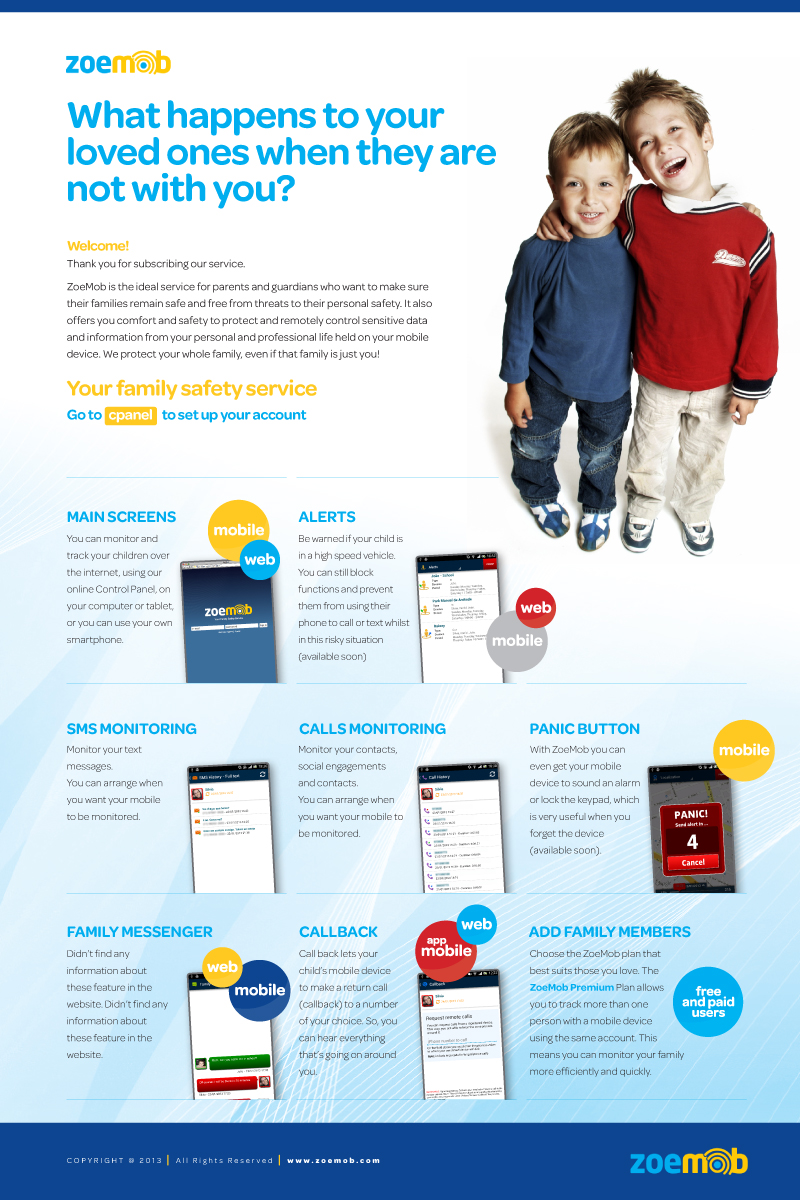
Want to win a job like this?
This customer received 15 newsletter designs from 6 designers. They chose this newsletter design from FMatos as the winning design.
Join for free Find Design Jobs
- Guaranteed
-
 US$300
-
 15 designs
-
 6 designers
Newsletter Design Brief
ZoeMob is a cloud-based mobile service for families. Installing ZoeMob, parents can to monitor their loved ones location by mobile app or web dashboard and receive alerts if they arrive or left a place like school, home, shopping or any other place. They can do even more like to monitor calls, sms, make callbacks and receive and send messages from and to kids by the private channel Family Messenger.
The main idea is create a “Welcome E-mail” to show to user that there is two ways to access ZoeMob Family Safety Service: mobile app and web app (called Web Control Panel). The user will receive this e-mail few seconds after app installation from Google Play Store.
The look and feel must to consider the concept of TLC (Tender Love & Care). ZoeMob users are parents looking for a service to keeping in touch and to protect their loved ones. So we recomend you install the app and use boths mobile app and Web Control Panel to understand better the service.
LINKS TO ZOEMOB
https://www.zoemob.com (website)
https://panel.zoemob.com (Web Control Panel).
https://play.google.com/store/apps/details?id=com.celuloc.client (Google Play Store)

Updates
Project Deadline Extended
Added Sunday, February 10, 2013
Target Market(s)
ZoeMob users are parents looking for a service to keeping in touch and to protect their loved ones (less 18 years old).
Industry/Entity Type
Shopping
Look and feel
Each slider illustrates characteristics of the customer's brand and the style your logo design should communicate.
Elegant
Bold
Playful
Serious
Traditional
Modern
Personable
Professional
Feminine
Masculine
Colorful
Conservative
Economical
Upmarket
Requirements
Must have
- 1) ZoeMob logo
2) Welcome phrase header (title)
3) Welcome text
4) Action button to link user to Web Control Panel (
5) Features (with picture and description)
- Main Screen (web and mobile)
- Alerts (web and mobile)
- SMS monitoring
- Calls monitoring
- Panic button (mobile)
- Family Messenger (web and mobile)
- Callback (web and app mobile)
- How add family members (free and paid users)
6) Footer

