

 Refresh
BenchEzy Solid Surface
Want to win a job like this?
This customer received 19 graphic designs from 3 designers. They chose this graphic design from Logo100 as the winning design.
Join for free Find Design Jobs
- Guaranteed
-
 A$190
A$190
-
 19 designs
-
 3 designers
Graphic Design Brief
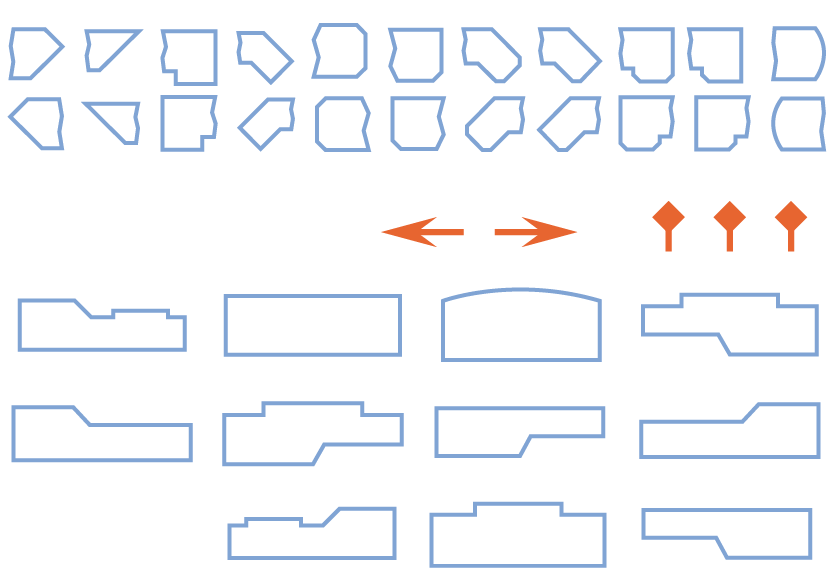
Graphics To be used in a Windows Application Images are to indicate to the application user what type of selection they have made. The application is to be used in the joinery industry so it would be good to follow in the theme of house plans, architectural drawing type . The file named "Benches", there will be one of each of the screen dumps i have provided. Space allocated for these images in the application is 227 pixels wide and 110 pixels high. The "Ends" file will be one of each as per document and the same again mirror reversed, ie left hand and right hand. Space allocation for these is 144 x 144 pixels. The general idea is that the "bench" images represent a kitchen bench and the "ends" represent the end of a kitchen bench They all need to be on transparent backgrounds and supplied as such. Any questions or more information you can contact me at your convience Thanks
Update 21/10/19
The sample images (Coloured)_ are images that i have used previously for a similar application. I made these images myself and would like the new application to have a more quality look and feel about it.
The image called "join bolt" or "join" will hopefully indicate a bit better the result i am looking for the "End" machining operations and the images branded bench are the bench top types.......sorry if my desciption is not explanatory....
The sample images are coloured but i was thinking that it might be better if the new images where more like line drawings to possibly keep with the architectural feel....this of course may not end up being the best way to go....and we may need to go with the fully coloured option again to be able to make use of 100% of the allowed pixel size as opposed to having a line only type set further in from the boundary.....
Update 22/10/19
Trying to explain what i want is a bit difficult....sorrry
Let me try a different approach...
"Benches"
Imagine a piece of coloured material that is rectangular in shape, lets say 2000 x 900 and we are going to machine these shapes from this sheet. Th shape is will be machined on all edges to to be cut from our original sheet of material...I want to indicate this to the user. Now on each end of the bench the user can select a different type of end to be included in the machining operation. I have added another document (Images - Assembled) to try and indicate how the pieces fit together. So that as the user steps through the following process he is nuilding a completed bench top.
1. Select Basic bench shape
2. Select type of end for the LH end
3, Select type of end for the RH end
Once he has selected his / her choices the application will build the drawing of the completed bench which will look like The last image in the "Image - Assembled" document....
23/10/19
Below is a link to one of the videos on my YouTube for an older application of mine that has been written using very very similar principles but is written for a different type of counter top material that requires different machining logic compared to the new application that these images are for.
Watching any of the videos there will help to provide some insight on what i am chasing
https://www.youtube.com/playlist?list=PLXnkWpdOS9gxcVv2cLoAEbV-YSJHCjyu1
I hope it is helpful to everybody
Industry/Entity Type
Residential Construction
Colors
Designer to choose colors to be used in the design.
Look and feel
Each slider illustrates characteristics of the customer's brand and the style your logo design should communicate.


